Wednesday, October 22, 2014
Hide Secrets Premium Pics SMS Apps v2 5

Hide Secrets Premium - Pics, SMS, Apps v2.5
Requirements: Android 2.2 and up
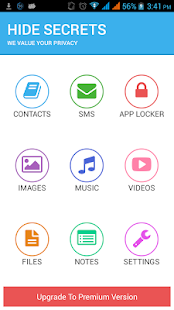
Overview: Hide Secrets (The Secret Vault) - Hide Pictures, Text Messages / SMS, Videos, Applications/ apps, Any Files, Contacts, Call Logs and Notes in your Android phone. Hide Secrets is 100% ADS FREE !!
Hide Secrets lets you hide everything you can imagine - Contacts, Call Logs, SMS, Pictures, Videos, Any kind of Files, Lock Apps and hide personal data in the secret vault.
Features of Hide Secrets App
● Secret Contacts, Call logs, Text Messages:
You can create a secret contact. All the calls and text messages from those secret contacts would always be hidden from the default call logs and messages app and would be safe in secret vault.
● App Locker:
WhatsApp, FaceBook, Instagram, Twitter, Phone, Gallery, File Manager...Lock anything you like with the AWESOME App Locker provided within Hide Secrets.
Here we give you three types of security options for better security of your secret apps
-> PIN Lock
-> Password Lock
-> Pattern Lock
Fake Crash (Premium) - with this feature enabled, others will always think that your app is getting crashed while only you know how to open your secret app
● Secret Pictures, Videos, Files, Notes:
You can hide any of your pictures, videos, audio files or any other files and you can also store your secret notes safely within the Hide Secrets app/ secret vault.
Premium Features
● Invisible Mode:
You can completely make Hide Secrets invisible by choosing to hide the app icon from settings. By enabling this feature, you can avail maximum security for your data.
● Hide Secrets Protector:
If someone can uninstall hide secrets app from your phone, how can it protect your data safely? By enabling this feature, nobody would be able to uninstall hide secrets app without entering correct password which gives you Z level security.
● Escape PIN:
This is like fake secret vault. If you are stuck in a situation where you cant say NO and have to open the app, you can put escape PIN which will open the app but it wont show any of your data.
● Triple Layer Security:
If you want Z level security for your data than you can choose all the three types of locks for the app instead of choosing only one type of lock. We give you three locks namely
-> PIN Lock
-> Password Lock
-> Pattern Lock
Nobody would be able to open the hide secrets app just by knowing a single password, which gives more security to your data.
Download Hide Secrets now and keep your private things private. Because we value your privacy.
If you are facing any issue, please put us a mail and we will resolve your issue within 24 hours.
Whats New
added more security to the app.
Premium features are unlocked!!
Requirements: Android 2.2 and up & 2.2 MB
Google Play
Download Hide Secrets Premium - Pics, SMS, Apps v2.5 Apk or Apk

Sunday, October 5, 2014
SMS Text Messaging ↔Text on PC 5 2 3


SMS Text Messaging ↔Text on PC 5.2.3 on Google Play
Download :
Download SMS Text Messaging ↔Text on PC 5.2.3
Requires Android: 2.2 and up
Category: Communication
v5.2.3 update:
MMS settings: APN settings can be set up manually
Bug fix: Korean MMS haven’t been displayed correctly
Bug fix: Notification did not disappear, even if the text has been read
Overview:
TEXT MESSAGING ANYWHERE, TEXT MESSAGING ANYTIME AND TEXT MESSAGING ON ANY DEVICE & TEXT FROM COMPUTER!
Text from your computer and tablet – just like on your smartphone! mysms is synced with your phone and uses your current Android phone number.
After installing mysms on your Android device you can start to text from your computer and web browser at app.mysms.com. mysms uses your existing mobile number, contacts and SMS text messages from your Android phone.
But there’s even more – mysms is your messenger (like iMessage) for Android. If your contact uses mysms too – you can use mysms as your new Messenger and text 100% free (free instant messages) using mysms friends. It does not matter if you’re using your phone, tablet, computer or web app.
HOW TO GET STARTED WITH THE MYSMS SMS APP
1) Install this Android app on your phone
2) Go to https://app.mysms.com on your computer, sync your phone with your browser and send your first text message.
MYSMS SMS APP FEATURES YOU’LL LOVE:
* SMS text messaging from your computer or tablet
* Receive SMS text messages directly in the browser, on your tablet or desktop app
* Sync SMS and MMS between your Android phone, tablet and on your computer
* Sync messages and calls between two smartphones (-> download mysms mirror)
* Unlimited free texting (instant messaging) to other mysms users
* Group Chat: Add up to 50 contacts to a group and start texting right away
* Remote SMS: Text online via your mobile carrier (no additional charge from what your carrier charges)
* Phone calls: Answer, dismiss, mute or dial a call on your tablet & computer
* Automatic SMS and MMS back-up to the cloud
* Backup SMS & MMS: Archive SMS and MMS messages in your Evernote, Dropbox or Google Drive.
* Multimedia messages: Sending pictures messages and messages with files
* DashClock integration: Notifications on incoming SMS messages
* Desktop notifications: Instant notifications on computer and tablet for new SMS text messages
* Evernote integration: Archive & backup messages. Your texts are saved to Evernote
* Smileys & Emoticons: Add emojis to your messages to show your friends how you feel.
* Expandable notifications
mysms is not only a great SMS texting app, you can even make voice calls on your tablet and computer (Bluetooth headset required). Works with PC, Mac and any browser (Internet Explorer, Firefox, Chrome, Safari, Opera …).
mysms is different from texting apps like Whatsapp and Kakaotalk because we not only support instant messaging/chat, we also integrate with your phone’s SMS inbox.
Connect mysms with Evernote, Dropbox, Google Drive or Email. Forward your messages to Evernote, Dropbox and Google Drive or save your SMS and MMS in your email account. mysms serves as an SMS backup and archive.
We’d love to hear from you! Do you have a suggestion, question or comment? Just email us at android@mysms.com. We’re trying to reply within 24 hours during weekdays.
You can also reach us on Facebook at http://facebook.com/mysms, Twitter http://twitter.com/mysms and Google+ http://gplus.to/mysms.
Keywords: text messaging, computer sms, computer texts, texting apps, sms app, texting from computer, text from pc, text from computer, sms from browser, browser sms, text free, remote desktop, dashclock sms notifications, imessage, remote sms, backup sms, backup mms, sms backup and restore, mightytext, browser texting, browser sms, desktop sms, save text messages to cloud, text from tablet, send sms via computer, dialer on tablet, dialer on computer, dial contacts from tablet, call from tablet, call from computer, call logs, SMS & MMS archive
Saturday, October 4, 2014
Textra SMS 1 77


Requires Android: 4.0 and up
Category: Communication
v1.77 update:
* For received messages, when sliding left to reveal timestamps we *NOW ALSO* show the time the message was originally sent as well as the received time (only if they differ).
* Bunch of bug fixes.
Change Log: http://inapp.textra.me/changelog
Overview:
Textra is a seriously beautiful, feature rich SMS and MMS replacement app.
Let’s face it, the stock Android Messaging app really sucks! So time to try something new, but it has to be pretty special, right? It’s here, it’s called Textra and it’s a seriously beautiful way to text.
Includes a bunch of great features like 800+ emoji’s, animated GIFs, animated emoji’s, dark mode themes, cool quick reply popup, better MMS and GROUP messaging. Plus ’oh so easy’ default or per contact customization for bubble colors, delivery reports, signatures and notifications (icon color, led color, sound, vibrate pattern, privacy, popup or simply turn off notifications, great for muting group conversations!).
It’s pretty bloody special; try it, tell your friends, shout from the treetops, but most of all enjoy it!
Simple. Beautiful. Fast.
Please follow us on Twitter, Facebook and Google+
http://twitter.com/TextraSMS
https://facebook.com/TextraSMS
http://plus.google.com/105622533565595900861
DUAL-SIM: Sorry we don’t yet support these phones.
★★★★★ Dan in April 2014
The VERY best FREE messaging replacement for the stock app on the galaxy S4. SMS is fast, and group chat MMS works perfectly as well. I am on Sprint (which supports MMS over WiFi) and Textra is the ONLY third-party messaging app that works with MMS on WiFi!!!!!! Plus it’s FREE, no ads. BUT you MUST uninstall other SMS apps first, as they can interfere with Textra. After I did that it was PERFECT.
NICE! Now works on KitKat – no more hangouts for me! they added Font Size too, nice.
★★★★★ Chase in April 2014
Simple. Beautiful. Fast. Even the dev’s know their app is just that good plus it’s free. Bar none, this is the best SMS/MMS replacement app I’ve ever used. As soon as I launched it the first time, I fell in love. Upon launch, Textra sets up all the technical stuff automatically in mere seconds. And boy, the speed doesn’t stop there. I have about 60,000 texts. With my stock app, I’d have to sit there and wait forever for various hiccups and loading and blah blah blah… I’ve tried every other SMS replacement app I could find. Textra is the only one that handles all of them without skipping a beat. It also lets you customize settings for each contact. Bubble color, icon color, notification sound, vibrate pattern, LED color… everything I want. And it just works. I don’t have to fight the app. The only issue I had was getting my MMS messages to work, but I emailed the dev’s, and within TEN MINUTES they responded. Within one night, we had about 18 or so emails back and forth, and by the end of it, they had pushed out a new version of the app (1.27) and my issue was magically fixed! I have never experienced such great support for an app before. I was blown away. I look forward to all the love and care this app will receive! Do yourself a favor and get Textra now!
★★★★★ Andrew in April 2014
Excellent free alternative to stock messaging. The program just works. You can set notifications, bubble colors and even delivery reports *per contact*. It’s great with Google Keyboard, love it. Emoji’s work perfectly with iPhone friends as does the group messaging. HIGHLY RECOMMENDED!
★★★★★ Christian in April 2014
This app is smooth and does the important functional things perfectly. It’s not bloated like Go SMS and Handcent. Works great with iPhone friends for group messaging and emoji’s very NICE! Also splits messages for CDMA networks as well. The timestamp feature per bubble (drag left) is SOOO slick. Great work! Good for those with limited eyesight too, as you can make the font size much bigger.
Textra is a seriously beautiful, feature rich SMS and MMS replacement app.
Friday, October 3, 2014
chomp SMS 5 91

chomp SMS is a souped-up alternative to the boring stock messaging app, with a heap more features. It s easier to use, it s more intuitive and it’s faster!Join the chomp revolution now at 10+ million strong!!!!Loads of cool features like 800+ emoji s, passcode lock, message lock, heaps of privacy options, schedule future texts (e.g reminders, birthday wishes), stop a text while sending, backup, blacklisting / SMS blocker (block ex-friend, spam etc), signatures, text snippets, quick reply popup, better MMS and GROUP messaging and much more
Plus heaps of theming options for notification icons, LED notification colors, ringtones, vibrate patterns, colors, font types, font sizes and background wallpapers. Create your own unique look, give it some bling!
Give chomp SMS a try today! It s pretty damn neat
Looking for a messaging app that s a little more lightweight (less features), but lightning fast? Give Textra SMS a try.
????? Mark in November 2013
Handcent SMS and GO SMS Pro are just over complicated, bloatware and sloooow. chomp SMS is easier to use, it s way faster and it s pretty cool. Group Messaging rocks with my iPhone friends!!!
????? Andrew in November 2013
Tried a few messaging apps out there, but none compares to chomp SMS. It s just faster and easier to use than the rest! Highly recommended. Using it on an LG Optimus Black with Android ICS. Yeh works with KitKat.
????? Jenny in November 2013
Love it Switched from GoSMS and chomp doesn t disappoint! A lot easier and smoother to customize than the other ones. Love it.
Screenshots:


Download via Drive:
Download Here
Saturday, September 27, 2014
SMS Backup Restore Pro Apk Free Download
 |


Thursday, September 25, 2014
Call and SMS Easy Blocker APK

Features:
- Block unwanted/spam calls and text messages
- Block private & unknown callers
- Call waiting block support
- Blocked SMS will be erased before received
- You can easily monitor blocked calls/SMS from the blocked log
- Blacklist and blocked log backup facilities
- Easy to use
Download APK
SMS Backup Restore Pro v6 01 Apk Mediafire

App Review:
A simple App to Backup and Restore SMS Messages. This is a Paid No-Ads version of the Ad-Supported Free App.
Note: On newer phones with inbuilt storage the default backup location will probably be the internal storage card and not the external. This is because the phone reports the storage that way. If you intend to do a factory reset on the phone, please make sure you save/email a copy of the backup outside the phone before doing the reset.
* Automatic Scheduled Backups.
* View Backup Contents.
* Backups created in XML Format on the SD Card.
* Option to backup selected conversations only.
* MMS not supported yet.
NOTE: There is a known problem with some firmware versions of the Droid X and Droid 2 phones that the restored messages do not get the correct time stamps.
This App needs the following permissions to work:
* Storage – modify/delete SD card contents (android.permission.WRITE_EXTERNAL_STORAGE): To create the xml file on the SD card.
* Your messages – edit SMS or MMS, read SMS or MMS (android.permission.READ_SMS, android.permission.WRITE_SMS): Needed to read SMS during backups and write them during restore.
* Your personal information – read contact data (android.permission.READ_CONTACTS): To display and store the contact names in the backup file.
* System tools – prevent phone from sleeping (android.permission.WAKE_LOCK): To prevent the phone from going to sleep/suspended state while a backup or restore operation is in progress.
* Hardware controls – control vibrator (android.permission.VIBRATE): To vibrate the phone when the backup or restore operation is completed.
Translations:
- Finnish – Thanks to Juhana H.
- Russian – Thanks to Pavel (Павел Миронов)
- Spanish – Thanks to Miguel A. Alvarez
- French – Thanks to Julien Benoist
- German – Thanks to Marc Hillesheim & Jan Allan Zischke
- Dutch – Thanks to Kristof Roels
- Portuguese – Thanks to António Silva
- Italian – Thanks to Oliver Thomas Cervera
- Polish – Thanks to MSZ & MR
- Swedish – Thanks to Björn Lindahl
- Estonian – Thanks to Margus Palu
- Simplified Chinese – Thanks to Thomas Wang
- Slovenian – Thanks to TKL
- Welsh – Thanks to Huw Waters
- Czech – Thanks to Jiri Trcka
- Macedonian (Republic of Macedonia – F.Y.R.O.M.) – Thanks to Vlad
- Turkish – Thanks to Hasan Gök
- Hungarian – Thanks to Kojedzinszky Dániel
- Hebrew – Thanks to s_h
- Traditional Chinese – Thanks to Bernie Huang
- Korean – Thanks to HoeLyn Do (도회린)
- Norwegian – Thanks to Dag Jøran Hanssen
- Danish – Thanks to Jeppe Leth Nielsen
- Romanian – Thanks to Gabriel Peca
- Greek – Thanks to Michael and Dimitrios.